Rivian Geo via Meshtastic

The Adventure
Section titled “The Adventure”Before going into the details of this, ill just start with the pilot results.
With a meshtastic node onboard, and resiliance built in for connectivity issues, I was able to get the following data from my Rivian R1S on a trip around Gun Lake, Michigan while passively polling the device. The trip was about 20 minutes with a poll interval of 60 seconds with a speed limit of no more than 45 mph… total trip around 14 miles.
With a quick conversion script, I was able to plot the geo data from the meshtastic node on a map with geojson.io
Convert Meshtastic to Geojson geojson.py
import jsonimport os
def convert_folder_to_geojson(input_folder, output_filename):    geojson = {        "type": "FeatureCollection",        "features": []    }
    # Iterate through every file in the folder    for filename in os.listdir(input_folder):        print(filename)        if filename.endswith(".json"):            file_path = os.path.join(input_folder, filename)
            try:                with open(file_path, 'r') as f:                    data = json.load(f)
                polled_at = data.get("polled_at", "Unknown")                nodes = data.get("nodes", {})
                for node_id, node_data in nodes.items():                    pos = node_data.get("position", {})
                    # Check if the node has latitude and longitude                    if "latitude" in pos and "longitude" in pos:                        user = node_data.get("user", {})                        metrics = node_data.get("deviceMetrics", {})
                        feature = {                            "type": "Feature",                            "geometry": {                                "type": "Point",                                "coordinates": [pos["longitude"], pos["latitude"]]                            },                            "properties": {                                "node_id": node_id,                                "name": user.get("longName"),                                "shortName": user.get("shortName"),                                "hwModel": user.get("hwModel"),                                "role": user.get("role"),                                "batteryLevel": metrics.get("batteryLevel"),                                "voltage": metrics.get("voltage"),                                "altitude": pos.get("altitude"),                                "polled_at": polled_at,                                "timestamp": pos.get("time")                            }                        }                        geojson["features"].append(feature)
            except Exception as e:                print(f"Skipping {filename}: {e}")
    # Write the combined GeoJSON to a file    with open(output_filename, 'w') as f:        json.dump(geojson, f, indent=4)
    print(f"Success! Created {output_filename} with {len(geojson['features'])} points.")
# --- SETTINGS ---# Replace 'my_json_files' with your actual folder pathinput_dir = '/home/sween/Downloads/gcp/deezwatts/'output_file = 'combined_mesh.geojson'
convert_folder_to_geojson(input_dir, output_file)
Download Geo Data for Reference
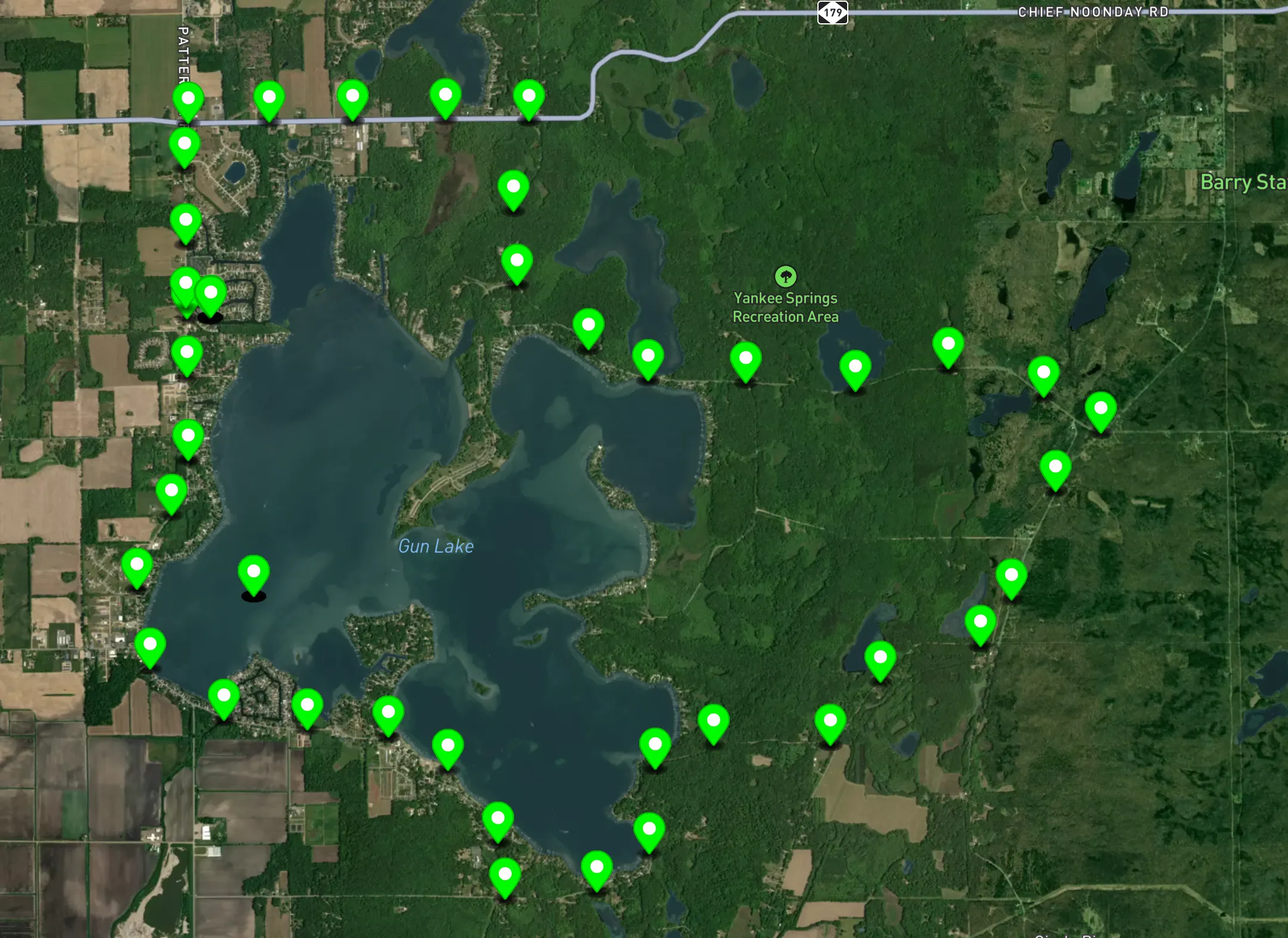
Not too shabby for less than $25!
Lets talk about the node itself and how the sausage gets rolled.
Meshtastic Node
Section titled “Meshtastic Node”Meshtastic Node onboard, a $25 lojack for my $80k+ truck.
Any node I have with GPS enabled will broadcast its location to the mesh network. I picked up the Happy Meal Kit from SEEED to try to avoid the Rabbit Hole, but I’m now almost 20 nodes deep so that did not work.
I set the Meshtastic device to query the GPS as often as possible,ut there is a distinction between how often it looks at the satellites (Update Interval) and how often it tells the mesh where it is (Broadcast Interval) and want to account for both.
To get the most “aggressive” tracking possible, I adjusted two specific settings in the Position configuration.
-
GPS Update Interval (
position.gps_update_interval) I used this to control how often the device wakes up the GPS module to get a new lat/long fix.- Default: 120 seconds (2 minutes).
- Aggressive: I set this to 30 seconds or even 10 seconds.
-
Smart Broadcast Settings Meshtastic is designed to be polite to the network. If I’m not moving, it won’t spam the airwaves. To make it “aggressive” while I’m moving:
- Enable Smart Broadcast: I ensured this is ON.
- Smart Broadcast Minimum Distance: I set this to 10 meters (or my preferred minimum). The device only broadcasts if I’ve moved at least this far since the last update.
- Smart Broadcast Minimum Interval: I set this to match my GPS Update Interval (e.g., 30 seconds). This is the “speed limit” for how fast it can talk to the mesh.
My Settings:
Mobile App:
Section titled “Mobile App:”Settings > Position.
- GPS Update Interval to
30. - Smart Broadcast is enabled.
- Smart Broadcast Minimum Distance to
10.
CLI (Python):
Section titled “CLI (Python):”meshtastic --set position.gps_update_interval 30 \--set position.broadcast_smart_minimum_distance 10 \--set position.broadcast_smart_minimum_interval_secs 30Aggressive Tracking
The “Tracker” Role: I set my device.role to TRACKER. This tells the firmware to prioritize position updates and often disables power-saving sleeps that might delay a GPS lock.
Position Flags: In the settings, I ensured I had Speed and Heading enabled in the “Position Flags.” If I’m moving fast, this data is just as valuable as the coordinates.
The Autonomous Deezwatts Meshtastic Sync Service
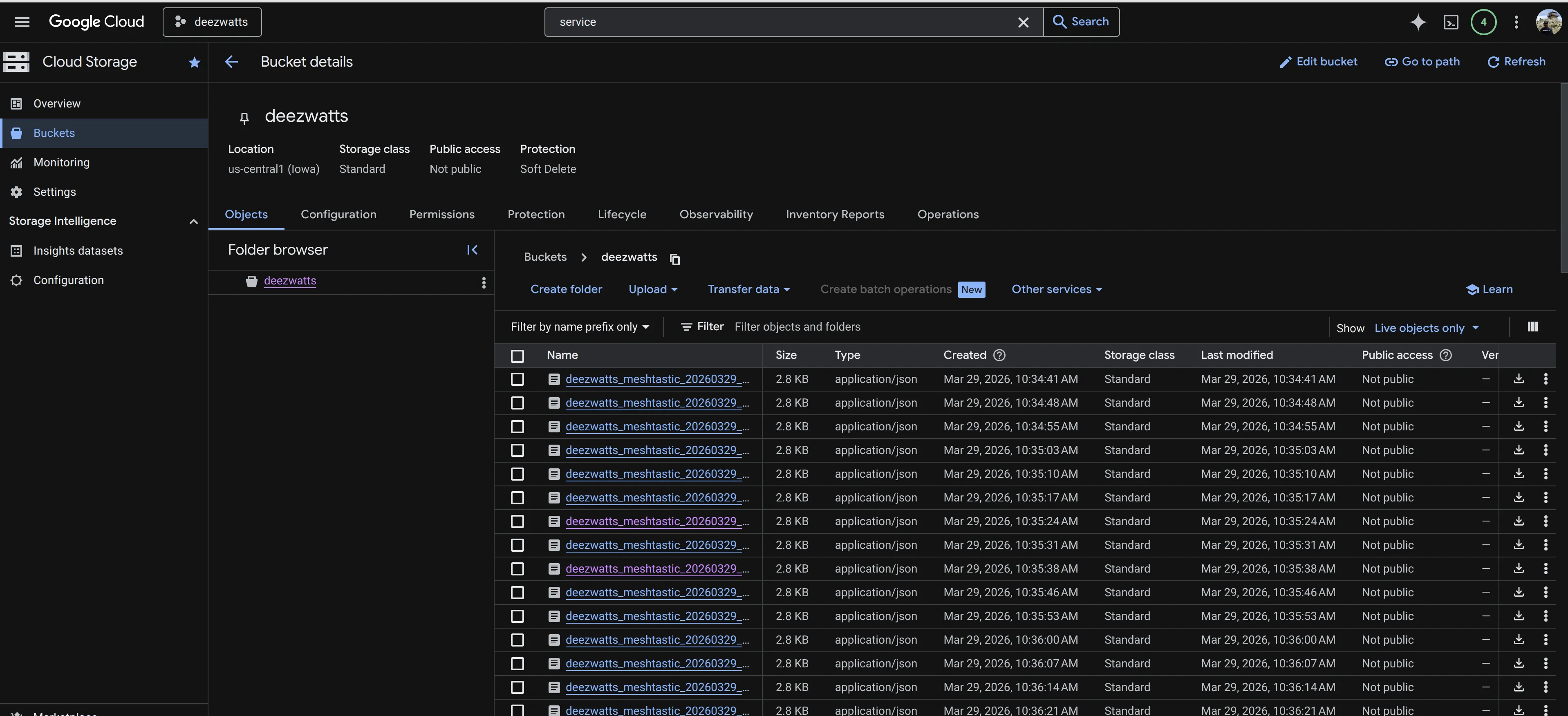
Section titled “The Autonomous Deezwatts Meshtastic Sync Service”With an aggressive poll cycle, I configured a script as a service that dumps node information, polling for precise geo data from my Meshtastic device whenever the vehicle is in motion. This telemetry is serialized and streamed directly to a GCP bucket as JSON, creating a persistent, cloud-based record of every Michigan mile.
Meshtastic Sync Service Python Script sync_script.py
import meshtasticimport meshtastic.serial_interfaceimport jsonimport osimport globimport timefrom datetime import datetimefrom google.cloud import storage
# --- Configuration ---BUCKET_NAME = "deezwatts-meshtastic-bucket"LOCAL_DIR = "./pending_uploads"POLL_INTERVAL = 60  # 10 minutes in seconds# os.environ["GOOGLE_APPLICATION_CREDENTIALS"] = "/path/to/key.json"# ---------------------
os.makedirs(LOCAL_DIR, exist_ok=True)
def upload_to_gcp(data, filename):    """Attempts to upload to GCP, returns True if successful."""    try:        client = storage.Client()        bucket = client.bucket(BUCKET_NAME)        blob = bucket.blob(filename)        blob.upload_from_string(            data=json.dumps(data, indent=4, default=str),            content_type='application/json'        )        return True    except Exception:        return False
def sync_backlog():    """Checks the local folder for files that failed previously."""    backlog_files = sorted(glob.glob(os.path.join(LOCAL_DIR, "*.json")))    if not backlog_files:        return
    print(f"Found {len(backlog_files)} pending files. Attempting sync...")    for file_path in backlog_files:        filename = os.path.basename(file_path)        try:            with open(file_path, 'r') as f:                data = json.load(f)
            if upload_to_gcp(data, filename):                os.remove(file_path)                print(f"  Synced and cleared: {filename}")            else:                print(f"  Cloud still unreachable. Stopping sync.")                break # Stop trying if the first one fails        except Exception as e:            print(f"  Error reading {filename}: {e}")
def run_task():    """The core polling logic."""    print(f"\n--- Starting Poll: {datetime.now().strftime('%Y-%m-%d %H:%M:%S')} ---")    interface = None    try:        # Connect to radio        interface = meshtastic.serial_interface.SerialInterface()        nodes = interface.nodes
        timestamp = datetime.now().strftime("%Y%m%d_%H%M%S")        filename = f"nodes_{timestamp}.json"
        payload = {            "polled_at": datetime.now().isoformat(),            "nodes": nodes        }
        # Try Cloud        if upload_to_gcp(payload, filename):            print("Success: Data sent directly to GCP.")            sync_backlog() # If cloud is up, clear any old local files        else:            # Fallback            filepath = os.path.join(LOCAL_DIR, filename)            with open(filepath, "w") as f:                json.dump(payload, f, indent=4, default=str)            print(f"Offline: Saved {filename} to local buffer.")
    except Exception as e:        print(f"Connection Error: {e}")    finally:        if interface:            interface.close()
def main():    print(f"Service started. Polling every {POLL_INTERVAL/60} minutes.")    print(f"Monitoring device and GCP bucket: {BUCKET_NAME}")
    while True:        run_task()        print(f"Sleeping for {POLL_INTERVAL/60} minutes...")        time.sleep(POLL_INTERVAL)
if __name__ == "__main__":    try:        main()    except KeyboardInterrupt:        print("\nStopping service...")
To make this a professional background service, I created a Systemd Service. This ensures the script starts when the Rivian is powered on, restarts automatically if it crashes, and logs all its output to the system journal.
Create the Service File
Section titled “Create the Service File”I opened a terminal and created the following file (using sudo):
cat > /etc/systemd/system/deezwatts-meshtastic-sync.servicePaste the Configuration
Section titled “Paste the Configuration”Here is the meat and potatos of the service file.
Systemd Service Configuration deezwatts-meshtastic-sync.service
[Unit]Description=Deezwatts Meshtastic to GCP Sync ServiceAfter=network.target
[Service]User=sweenGroup=dialoutWorkingDirectory=/home/sween/deezwatts-meshtasticExecStart=/usr/bin/python3 /home/sween/deezwatts-meshtastic/sync_script.py
# Environment variable for GCP CredentialsEnvironment="GOOGLE_APPLICATION_CREDENTIALS=/home/sween/deezwatts-meshtastic/deezwatts-bucket-key.json"
# Restart logicRestart=alwaysRestartSec=30
[Install]WantedBy=multi-user.target
Enable and Start
Section titled “Enable and Start”This raspberry pi is powered by the Rivian’s 12v system and is always on when the vehicle is on.
# I reloaded systemd to recognize the new filesudo systemctl daemon-reload
# I enabled the service to start on bootsudo systemctl enable meshtastic-sync.service
# I started it right nowsudo systemctl start meshtastic-sync.service
Once you have this running on in interval, the service will attempt to upload (or cache) the geo data to GCP, with any luck, you can see itd being created about once a minute.